
Module · Live
Deployment Home: one guided, role-aware portal for complex rollouts
The guided rollout portal — used today for ERP, eCommerce, Life Sciences, and Nursing Home implementations. Replaces the dozen tabs your team has open with a single, role-aware workspace where every artifact lives next to the work it belongs to.
Guided questionnaires
Phase-aware, role-aware. Branching logic by vertical (ERP, eCommerce, Life Sciences, Senior Care) and engagement type. Every answer feeds Atlas.
Configuration mapping
Vertical-specific mapping with prior-engagement suggestions: CoA for ERP, catalog & payments for eCommerce, validation plans for Life Sciences, case-mix for Senior Care. Saves the senior consultant for the calls that matter.
Partner registry
One place to find the integration partners, BPOs, and adjacent ISVs you already trust — with reviews from prior projects.
AI workflow insights
Surfaces stuck workstreams, risk patterns, and missing dependencies before the weekly status meeting does.
In short
What Deployment Home does
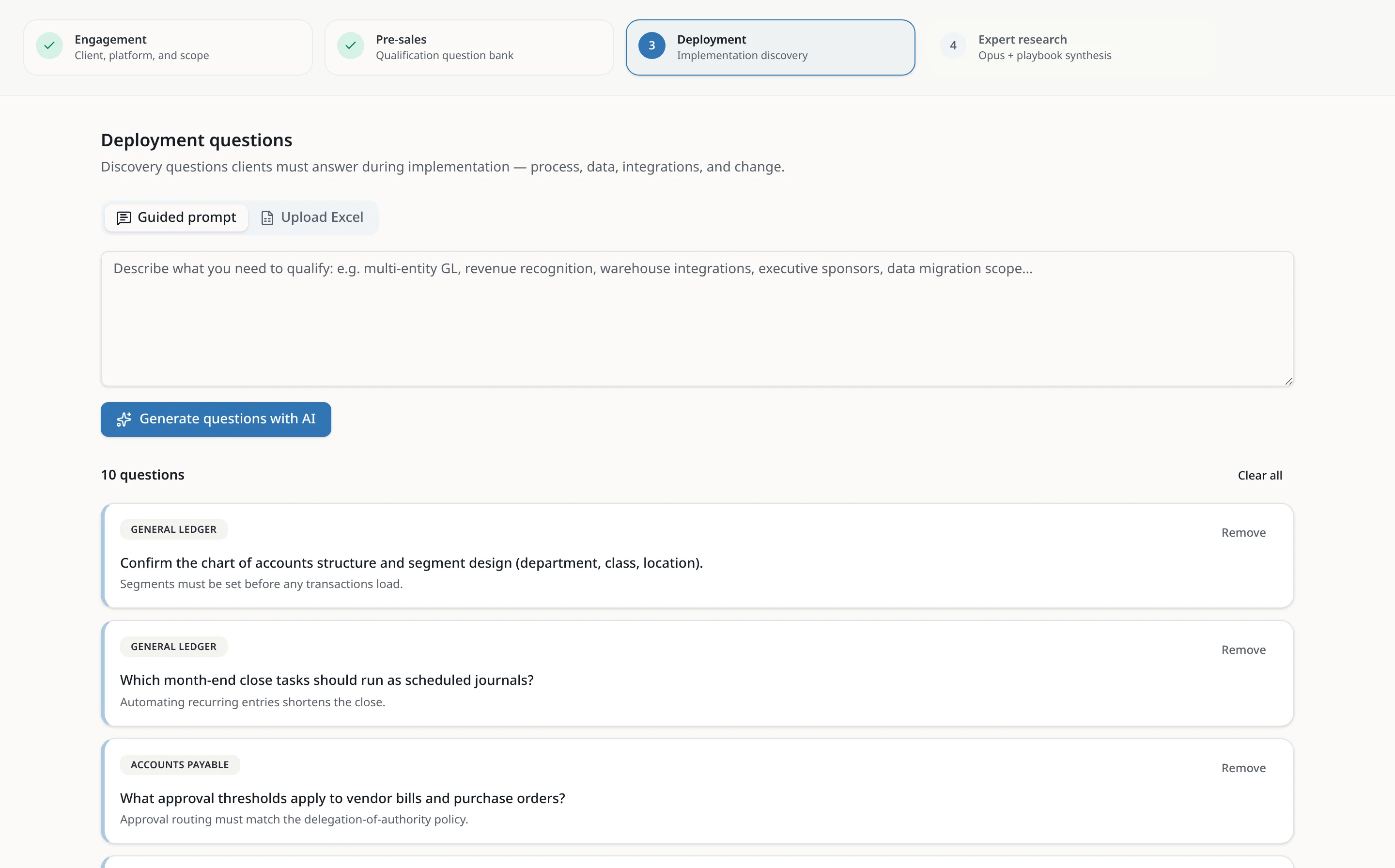
Deployment Home is the implementation workspace of PredictiveDeployment. It turns your implementation methodology into guided questionnaires, scope decisions and mapping workbooks that your team, your systems integrators and your client fill in together, in one place.
Each answer is saved as it is typed and shared with everyone on the project. Client-facing answers and internal notes are kept separate, and progress by module shows what is still open before each phase gate.
In the product
How it works
- 1
Create the project
A platform admin creates the client project and assigns people as Deployment Team, Systems Integrator or Client.
- 2
Qualify in pre-sales
Work through the pre-sales question bank to agree scope and fit before the statement of work.
- 3
Run discovery by module
For each functional area, mark questions in or out of scope and capture the client's response. Answers autosave and appear for teammates.
- 4
Map configuration
Use the templates and mapping workbooks (for example chart-of-accounts roll-ups in ERP) and keep them with the project instead of in email.
- 5
Track and report
Progress by module, internal notes and AI workflow insights show your team what is blocked before the weekly status meeting.
Spreadsheets vs. Deployment Home
| Spreadsheets, decks and shared drives | With PredictiveDeployment | |
|---|---|---|
| Client answers | Spread across emailed workbooks and meeting notes | One questionnaire per module, saved as people type |
| Scope | Decided in calls, rarely written down per requirement | In or out of scope recorded on every question |
| Internal notes | Mixed into the same file the client sees | Kept in a separate column clients can never open |
| Status | Rebuilt by hand before each meeting | Progress by module, always current |
| Reuse | Start each project from an old copy | Templates and workbooks reused across projects |
Who it's for
Senior consultants
Capture your methodology once and let the team run it.
Read moreSystems integrators
Work in the client's workspace with the access you need.
Read moreClient project leads
See what is in scope and what is waiting on you.
Read moreERP go-lives
From discovery to cutover and hypercare.
Read moreeCommerce replatforms
Catalog, payments and launch readiness in one place.
Read moreGxP validation
Validation plans for Life Sciences implementations.
Read moreFrequently asked questions
What is an ERP implementation methodology?
An ERP implementation methodology is the repeatable set of phases, questions, deliverables and sign-offs a team uses to take an ERP system from selection to go-live and hypercare. Typical phases are discovery, design and configuration, data migration, testing, training, cutover and post-go-live support. Deployment Home turns that methodology into guided questionnaires and templates, so every engagement follows it the same way.
What are the phases of an ERP implementation?
Most ERP projects move through discovery and planning, solution design, configuration and integration, data migration, testing (unit, integration and user acceptance), training and change management, cutover and go-live, then hypercare. Deployment Home tracks scope and answers per module so you can see which areas are complete before each phase gate.
What are ERP implementation best practices?
Agree scope early and record it per requirement, keep one shared source of truth for client answers, separate internal notes from what the client sees, reuse templates from past projects, and review open items every week. Deployment Home is built around exactly those habits: in-scope flags, client responses, internal-only notes and reusable workbooks.
Does Deployment Home only work for ERP?
No. ERP is where it started, and the same questionnaires, mapping workbooks and roles are used for eCommerce launches, Life Sciences implementations and Nursing Home transitions. Your own vertical can be added as a template.
Can clients and systems integrators use the same workspace?
Yes. Each person is assigned to a project as Deployment Team, Systems Integrator or Client. Clients see the questions, scope and their own responses; internal notes and AI insights stay visible only to your team and integrators, and that rule is enforced in the database.
Is there a free trial?
Yes — request a 14-day guided pilot from the contact page, with onboarding support and no credit card.
See Deployment Home with your data.
We'll spin up a sample engagement and walk you through it with one of our practitioners.